|OCR Comparison — Tesseract vs. Google Vision← Back to map
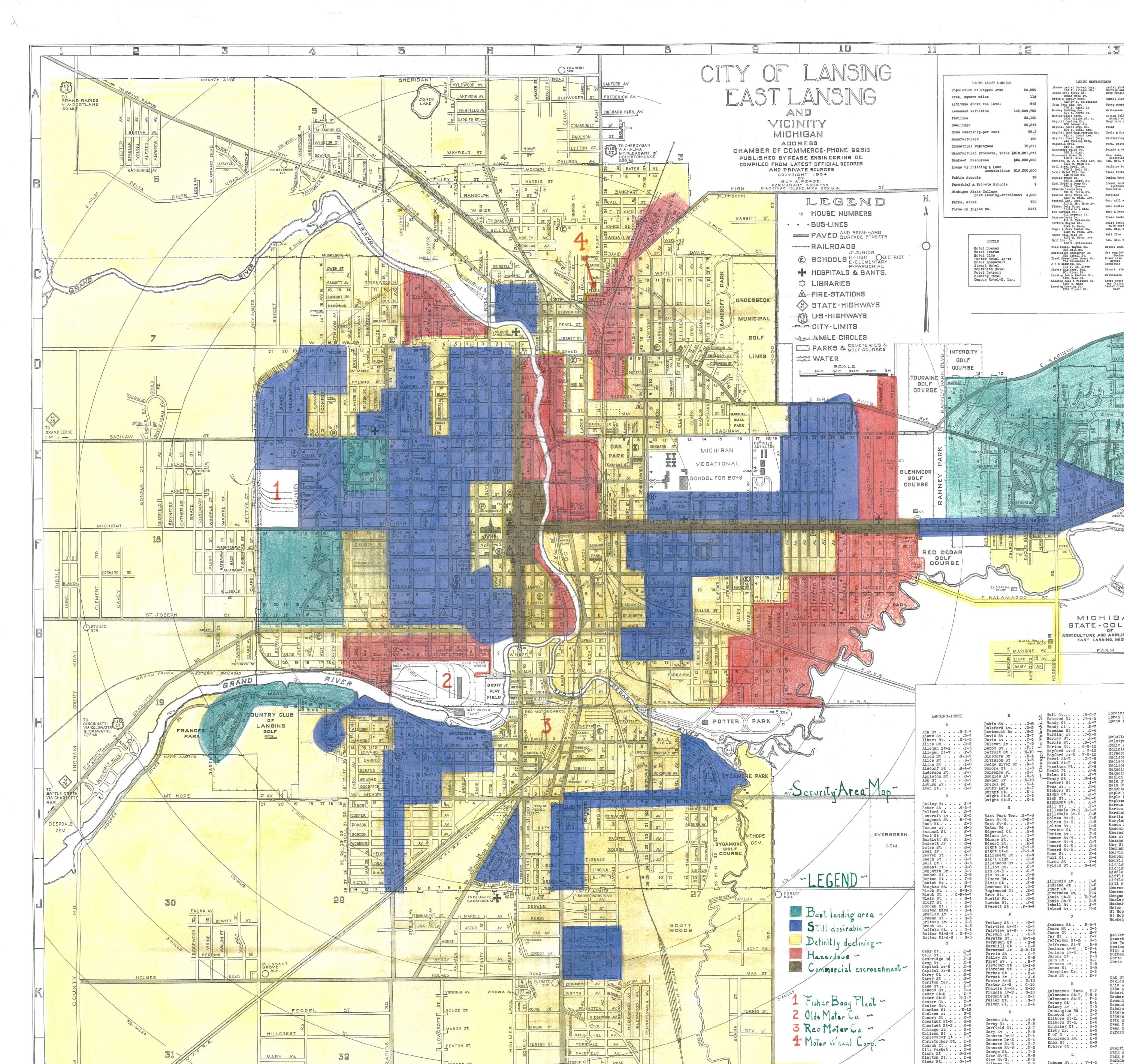
Extracting text from a 1935 federal document — two engines compared
Historical spatial research depends on archival documents that exist only as scanned images.
OCR converts those images into machine-readable text. This page runs the same crop through
Tesseract.js (open-source, client-side) and Google Cloud Vision
(neural API) so you can compare output and confidence side by side.
Tesseract: no key required — runs in your browser via WebAssembly. First run downloads ~10 MB; subsequent runs are instant.
|
Google Vision: requires an API key (1,000 free requests/month; billing account required).
Your key goes directly from your browser to Google — it is never sent anywhere else and is not stored beyond this session.
Region
Google Vision API key (optional)
Tesseract:Ready.
Google Vision:Ready — enter API key to enable.
Source document
1935 HOLC Security Map — City of Lansing, East Lansing and Vicinity, Michigan.
Published by Chamber of Commerce; compiled by Pease Engineering Co.
Source: Mapping Inequality / University of Richmond.
Extracted text Tesseract.js
Output appears here. Words are color-coded by confidence:
green >80%,
yellow 50–80%,
red <50%.
High (>80%) Medium (50–80%) Low (<50%)
Extracted text Google Vision
Enter a Google Cloud Vision API key and click Run Google Vision.
High (>80%) Medium (50–80%) Low (<50%)
Comparison
Why some text is wrong: Both engines struggle with this 1935 scan for the same reasons —
faded ink, age-yellowed paper, map color zones bleeding into text, street names at angles, and handwriting
in the legend. Tesseract works entirely in your browser with no preprocessing; Vision sends the image to
Google's neural model, which is trained on degraded documents and typically produces higher confidence on
archival material. In a production workflow you'd also binarize, deskew, and contrast-enhance the image
before sending to either engine.
Google Vision docs
·
Tesseract docs